Friday, January 17, 2020
Whether you like it or not it's time to upgrade to Windows 10
Windows 7 is officially out and if you're still on it, Microsoft will no longer receive Microsoft's security updates or fixes. Microsoft also wants people who are still using outdated operating system to upgrade to Windows 10 to keep their computer running securely and smoothly. If you have an old computer device that are still running on Windows 7 or Windows XP (lol) you can buy Windows 10 Home operating system on Microsoft's website for $139.
However, you can still get Windows 10 for free if you are using a licensed copy of Windows 7, Windows 8 or Windows 8.1 Home or Pro.
Here's what you need to do to Get a Free Windows 10 Upgrade
1. Go to the Microsoft's Software Download page to Download Windows 10.
2. Under the Create Windows 10 installation media, click Download tool now and Run.
3. Select "Upgrade this PC now", if you are updating the PC that you are currently using or choose Create installation media for another PC if you will update another PC, and save the installation files.
4. Follow the instructions.
5. Once you are done with the upgrade go to Settings Update & Security > Activation, and you should see a digital license for Windows 10.
Take note that if you are using Windows 7 or 8 Home license, you can only update to Windows 10 Home, if you have Windows 7 or 8 Pro you can only be updated to Windows 10 Pro.
However, if you are using an older PC or laptop Microsoft recently advice those who wants to upgrade to Windows 10 just to buy a new PC or laptop since it may cost you.
Posted on their website, Microsoft said: "For most Windows 7 users, moving to a new device with Windows 10 will be the recommended path forward. Today's PCs are faster, lightweight yet powerful, and more secure, with an average price that's considerably less than that of the average PC eight years ago."
"We recommend that you don’t install Windows 10 on an older device, as some Windows 7 devices are not compatible with Windows 10 or could experience reduced feature availability."
If you still want to buy you can try buying on Amazon for just $129.99 at this time.
Microsoft Windows 10 Home | Download
or if you want a Flash Drive:
Microsoft Windows 10 Home | USB Flash Drive $134.19
You can also check out new PC and Laptop if you want to save the trouble and just buy a new system with Windows 10 on it:
PC
Laptop
Thursday, January 16, 2020
Golden Farm Scam?
So How do you earn money from Golden Farm?
You need to purchase e-birds. Just go to "Buy birds" section, to buy e-birds. Those birds will lay eggs and you'll need to collect those eggs and sell them for silver coins. Once you've accumulated enough silver coins you can exchanged it for real money.
You can also get referrals to earn more silver coins. However, your referrals need to replenish their account in order for you to get the bonus.
Here's the walk-through when I signed up:
1. Once you registered you will get this message:
"We boldly declare that our project is stable and always fulfills its commitments. This can be confirmed by thousands of users who are consistently earning money in our project. Nevertheless, the administration of the project does not guarantee the derivation of profit from participation in the project. Your income depends entirely on you and on the deepness of participation in the project!"
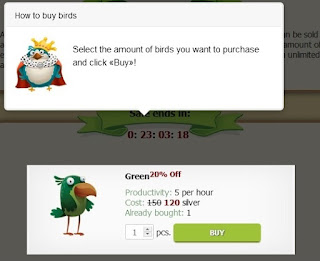
2. You get to buy your birds.

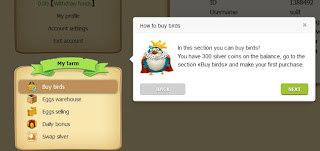
How to buy birds on golden-farm.biz? Go to "Buy birds" section, to buy e-birds.

In this section you can buy more birds!
3. How to collect eggs?

Once you bought a bird you will see this message
"You have successfully bought a «Green» bird!
After some time you will be able to collect eggs in your «Warehouse»!"
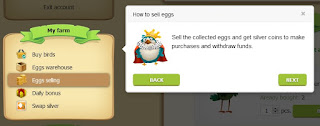
4. How to sell eggs on golden-farm.biz?

Sell the collected eggs and get silver coins to make purchases and withdraw funds.
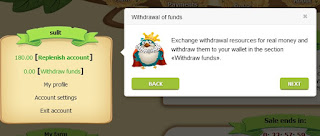
5. How to Withdraw your money?

Exchange withdrawal resources for real money and withdraw them to your wallet in the section «Withdraw funds».
6. How to replenish the balance? Proceed to «Replenish account» where you can replenish your silver balance to buy more birds!
7. Participate with their Affiliate program
Invite your friends to the game and get additional resources with our affiliate program!
8. After you finish the tour you will get 20 silver coins!
"You have successfully accomplished the tour!
Accept these 20 silver coins and begin an exciting adventure in the big world of Golden Farm!"
Is golden-farm.biz a scam? We will see, I will update this post if I can get a withdrawal or not.
In Trustpilot they are getting mixed reviews, and three stars for an average ratings.
If you want to join me and see if we can Make Money here, please Sign up <HERE>
Friday, November 29, 2019
Make Money Online Easy and Fast 2019: Cointiply Reviews
Can you make money online easy and fast on Cointiply?
Yes, it's not only a faucet in which you can earn money or cryptocurrency by clicking the "roll the faucet" button. It's very easy to claim money on cointiply just fill out a captcha and then click on the roll button and get a number. Your reward depends on the number you got. If you get a prime number you get a 16 Coin bonus.
What's great about Cointiply is it's not just a faucet to get satoshi coins, you can also earn from taking surveys, offers, and PTC(Paid To Click). It's a new site, it was created on February 2018.
Here are the different ways to earn on Cointiply:
1. Bitcoin faucet - this is their main earning program. Easy to do and easy to get.
2. Paid surveys - To get to the surveys go to the Earn Coins tab then click on Complete Surveys.
3. Offer walls - this is a way to make money by completing offers like downloading apps, signing up for free trials, signing up for contests, and more.
4. Watch videos - the site has a video tab where you can choose videos of different topics and get paid to watch them.
5. Multiply your coins - this one is a betting game. You can be your coins for more coins.
6. Play games
Cointiply Trustpilot rating is Excellent
https://www.trustpilot.com/review/cointiply.com
JOIN NOW HERE
Wednesday, October 30, 2019
Wednesday, October 16, 2019
How to Claim Your $358 From Yahoo Data Breach Settlement
Yahoo back in 2016 suffered two data breaches, on August 2013 in which one billion user accounts were stolen and another in 2014 which involved at least 500 million usernames and passwords. User account information including names, email addresses, telephone numbers, dates of birth and passwords were likely stolen.
How to File a Claim from Yahoo?
1. Go to www.yahoodatabreachsettlement.com
2. Fill out the Claim Form
3. If by mail, you can download and print the claim form, fill it out and mail it with any supporting documentation to: In re: Yahoo! Inc. Customer Data Breach Security Litigation, c/o Settlement Administrator, PO Box 1760, Philadelphia, PA, 19105-1760.
Or you can email the form at info@yahoodatabreachsettlement.com or call 1-844-702-2788 to have a form mailed to them.
4. Deadline to file is July 20, 2020
Here's an Online Basic Account Holder Claim Form Instructional Video if you need more assistance:
Sunday, October 13, 2019
Friday, September 20, 2019
Get $20 FREE When you SignUP
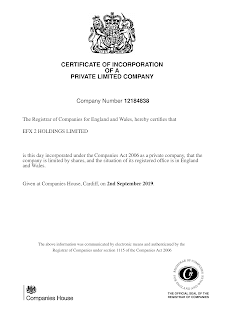
Join the EFX Coin which is the world's first coin combining forex and crypto currency markets and get $20 FREE just for signing up! Elitefinfx is an online trade company that trades Forex, Commodities, Cryptocurrencies and other financial markets. Elitefinfx makes use of Blockchain technology and advanced AI-matching system.
What it offers:
1. Systematic managed accounts with no hidden fees
2. Trade Forex, Options, and Cryptocurrencies
3. Meta Trader for Live Tracking
4. Become partner of our experienced fund manager
JOIN NOW HERE AND GET $20 FREE
Subscribe to:
Posts (Atom)